To stop a RAG system from showing a user data they cannot see, apply that user’s permissions inside the retrieval query, so a chunk they may not read is never fetched and never reaches the model. Your backend works out the permissions from the signed-in identity, the vector store enforces them with a namespace and a filter, and every tool call checks them again. A line in the prompt that says “do not reveal confidential data” is not a permission check.
RAG (retrieval-augmented generation) fetches chunks of your documents and gives them to a language model to answer from. I am Ash, a Staff engineer in Toronto. At a company I worked at I built an AI assistant for enterprise customers. Its retrieval ran vector search in Pinecone and Qdrant over customer data, filtered to what the asking user was allowed to see. The models were served in-region with zero data retention, and an MCP (Model Context Protocol) server exposed product actions to agents as tools, with a permission check on each one. I also built an evaluation suite that replays a fixed set of questions against every prompt or model change before release, and an audit trail that records each prompt, retrieval and tool call with its user and tenant.
This article is for engineers and technical leads about to put company documents behind an assistant.
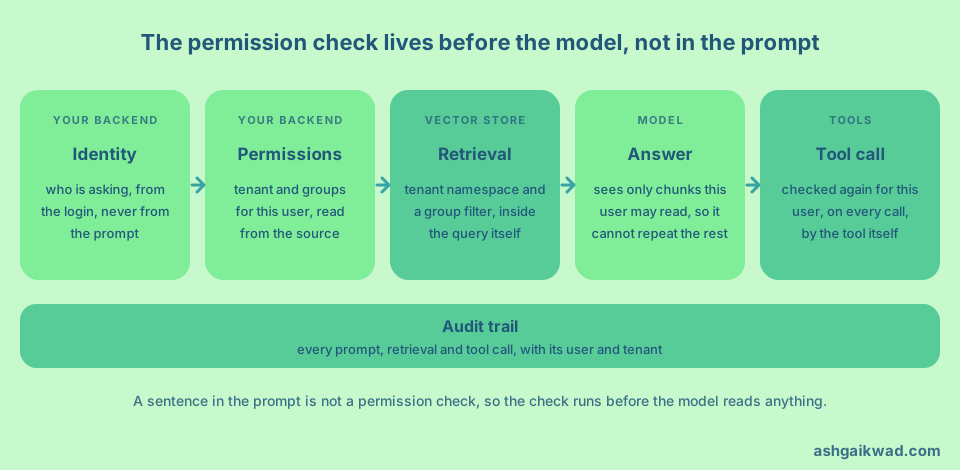
The prompt is not the control
Telling the model what it must not say does not hold. The OWASP Top 10 for LLM applications says that restrictions in the system prompt can help, but “such restrictions may not always be honored and could be bypassed via prompt injection or other methods”. The OWASP RAG security cheat sheet lists relying on the language model to enforce access control as something not to do, and says access control “must be enforced before content reaches the model”.
The model cannot know who may read what, because it only sees text. So I treat the context window like a screen. Anything in it can end up in front of the user, and the only safe rule is that a chunk the user may not read never enters it. Relevance and permission are two questions. A vector store ranks chunks by closeness to the question, so the closest chunk to a question about salaries is the salary document, and only something that knows the user can say whether they may read it.
Put the user’s permissions in the query
There are five parts to this.
First, take the identity from the session on your backend. Never accept a tenant, a role or a filter from the browser, and never let the model fill one in.
Second, store permission data on every chunk, not only on the source document. The OWASP cheat sheet says to keep access control metadata “alongside every vector chunk, not just the source document”. Each chunk is retrieved on its own.
Third, apply the filter in the search call. Pinecone’s metadata filtering is part of the search, where you add a filter “to limit results to the documents that match it”. Qdrant’s filtering works the same way. The weaker design is to fetch the top results and drop the forbidden ones afterwards, because the list can come back short and one missed step sends them to the model. My rule is that unauthorised chunks never leave the store.
Fourth, filter on groups, not on lists of people. Pinecone calls “filtering by large lists of individual user IDs” an anti-pattern and suggests access control groups such as organisation, project or role. It also documents a limit of 10,000 values in one $in or $nin operator, and a request over it fails.
Fifth, fail closed. If the backend cannot work out the user’s permissions, the search returns nothing and the assistant says it has no sources. Never fall back to “no filter”.
Draw the tenant boundary in the store
Give tenants a harder line than a filter. The vendors disagree on how.
Pinecone recommends one namespace for each tenant. Its multitenancy guide says that “each namespace is stored separately”, which “reduces the risk of application bugs that could search the wrong tenant’s data”. The alternative it documents is one shared namespace with a tenant field, and it warns that searches then “scan the entire namespace regardless of filters”, which is slower and costs more.
Qdrant goes the other way for many small tenants. Its multitenancy guide says that a separate collection for each tenant “is rarely the most efficient approach”. It partitions one collection by a payload field when tenants are many, small and similar, and gives each tenant a dedicated shard when they are fewer and larger.
I choose like this. The tenant boundary is a namespace, a shard or a partition that the query must name, because forgetting to name it should be an error. The user’s permissions inside the tenant are a filter on groups. If your store only has a payload filter for tenants, put the tenant condition in one shared function that every search calls, and let nothing else build a query.
It is the same idea as in my article on tenant isolation with PostgreSQL row-level security. For regulated fintech clients I made tenant isolation a database guarantee, so that one customer’s query cannot return another customer’s rows.
Check again on every tool call
Retrieval is one path to your data, and tools are the other. The model chooses when to call a tool and with which arguments.
The OWASP guidance on excessive agency names two mistakes. One is a tool that reaches a downstream system through a generic, high-privileged identity. The other is trusting the model to decide whether an action is allowed. Its advice is to implement authorisation in downstream systems “rather than relying on an LLM to decide if an action is allowed or not”, and to validate every request against security policy, which it calls complete mediation.
So each tool receives the identity of the asking user and checks it itself. The MCP server I built for the assistant had a permission check on each product action it exposed as a tool. A manipulated prompt can then change what the model asks for, but not what the tool allows.
In the MCP authorization specification, authorisation is optional in the protocol. Where you use it, servers must validate that access tokens “were issued specifically for them as the intended audience”, and the security best practices say that passing a client’s token through to another API is “explicitly forbidden”. For the design of the tools themselves, see how to give an AI agent tools it can call safely.
Stale permissions are the quiet leak
An index is a copy. When someone leaves a team or a document moves into a private folder, the source changes at once and the copy does not. Until you update it, the assistant answers from permissions that are no longer true. The OWASP cheat sheet warns against checking permissions only at ingestion, and against serving cached responses after permissions have changed.
You have two ways to handle it, and they trade freshness for cost. The first is to push changes. A permission change at the source triggers an update to the metadata on the affected chunks, and a deletion removes the chunks, their embeddings and any cached answers. It is cheap at query time and always slightly behind, so measure the lag. The second is to check live. Retrieve candidates with the group filter, then ask the source of truth whether this user can read each candidate document before it goes into the prompt. It is always current and costs a lookup.
My view is to use both. The index filter makes the broad cut, and the live check covers sources where a stale answer would hurt, such as legal and HR documents.
Two side doors carry the same risk. A response cache must be keyed by the user’s permissions, or it will serve one person’s answer to another. Citations and file names in the interface must pass the same check, because a title can reveal that a confidential document exists.
Log it, then test it
An audit trail answers what the model was given and why. OWASP’s guidance on vector and embedding weaknesses asks you to “maintain detailed immutable logs of retrieval activities”, and the cheat sheet adds that each retrieval should record the user’s identity and the access control metadata of the chunks returned. I built an audit trail that records each prompt, retrieval and tool call with its user and tenant.
The trail holds sensitive text of its own, and the cheat sheet advises not logging raw queries, retrieved content or tool arguments by default. Decide what you store and who can read it.
Then test the boundary. The NIST generative AI profile describes the data privacy risk as impacts from “leakage and unauthorized use, disclosure” of sensitive data, and recommends “regular adversarial testing”. Add leak cases to the evaluation set that already runs on every prompt or model change. The suite I built replays a fixed set of questions before each release, and permission cases belong in a set like that.
A good case has a low-privilege user ask for a restricted document directly, then ask around it with a paraphrase or a prompt that tells the model to ignore its rules. The assertion is on the retrieval trace, not on the answer. The test passes when no chunk the user may not read appears in the retrieved list or the tool results, whatever the model said.
What I would reject, and what it costs
I would reject prompt rules as a control, because a prompt can only ask. I would reject filtering after generation, because the model has already read the data. I would reject checking permissions only at ingestion, because permissions change after documents are indexed. I would also avoid a namespace for each user, because it copies shared documents into many places and turns each permission change into a re-indexing job.
None of this is free. Filters can slow a search, live checks add a lookup, and permission sync is a pipeline that someone must own and monitor. Separate collections and dedicated shards add overhead per tenant, which Qdrant is explicit about. The alternative is one user reading another customer’s data.
How to find the cause when a leak is reported
If an assistant quoted a document a user cannot open, start from the audit trail and not from the prompt. List the chunk identifiers that were retrieved for that request, and compare them with what the user could read at that moment. Usual causes are a search that ran without the filter, a service account with wider access, a store with no tenant boundary, stale permissions in the index, and a cache or a tool that delivered the content by another path. Then add the exact case to the evaluation set.
A plan for the first week
- Draw the data path from the user to the model, including every tool, and mark where the user’s identity is lost.
- Make the search function refuse to run without a tenant and groups from the session.
- Check that every chunk carries tenant and permission metadata.
- Give each tool its own permission check, and remove shared high-privilege credentials.
- Scope caches by permissions, and write down how stale the index may be.
- Turn on the audit trail, and add cross-user, cross-tenant and revoked-access cases to your evaluation set.
If your agents also edit code or run commands, my guardrails checklist for AI agents covers the same boundary from the tool side. A model that cannot see the data cannot leak it, which is a promise no prompt can make.
Frequently asked questions
Can I tell the model in the system prompt not to reveal restricted data?
No. OWASP says such restrictions may not be honoured and can be bypassed with prompt injection. Enforce access in the retrieval query and in every tool.
Should I use one namespace for each tenant or a metadata filter?
Use a namespace, shard or partition for the tenant when you can, because forgetting it becomes an error. Pinecone recommends namespaces, while Qdrant recommends a payload partition for many small tenants. Use a group filter inside the tenant for user permissions.
How do I handle permissions that change often?
Update chunk metadata from permission-change events and measure the delay. For sensitive sources, also check the source of truth for each retrieved document before it enters the prompt.
Do tools need their own permission check if retrieval is already filtered?
Yes. A tool is a separate path to data and actions, and OWASP advises implementing authorisation in the downstream system, not asking the model.
How do I test that my RAG system respects permissions?
Add leak cases to your evaluation set, such as a low-privilege user asking for a restricted document in direct and indirect ways, a cross-tenant query and a revoked permission. Assert on the retrieval trace that no unauthorised chunk was fetched, not only on the answer text.