It is easy to write software nowadays. So instead of writing one more deterministic web or mobile app, how about you write your own AI Agent? I use coding agents every day, but some of my tasks need a lot more customization than a coding agent can give. So I looked into making my own AI Agents, and here is how you can do it too.
As an example, I will walk you through an agent that manages your groceries. Every time you shop, you take a photo of the bill. The agent notes down the items and quantities you bought. Every time you cook or eat, you take a photo of the plate. The agent notes what you used. On Friday morning the agent makes a shopping list with the exact things you need to buy again, draws it as an image and puts it on your phone. I will show the full product lifecycle, from an empty folder to a job that runs every week, so that even if you do not write software for a living you can follow along and build it.
The agent is written in Ruby with RubyLLM, a library that talks to many model providers through one API. Its guide on agentic workflows is the backbone of this article. All the code is here, file by file, with an explanation after each one. It is around 500 lines of Ruby in total, and most of it is plain Ruby with no AI in it.
What we are building
The product has three parts. Your phone takes photos. A shared folder (iCloud Drive, Dropbox or Google Drive) carries those photos to your laptop. A Ruby program on your laptop reads the folder, does its work and writes the shopping list image back into the same folder, where your phone can see it.
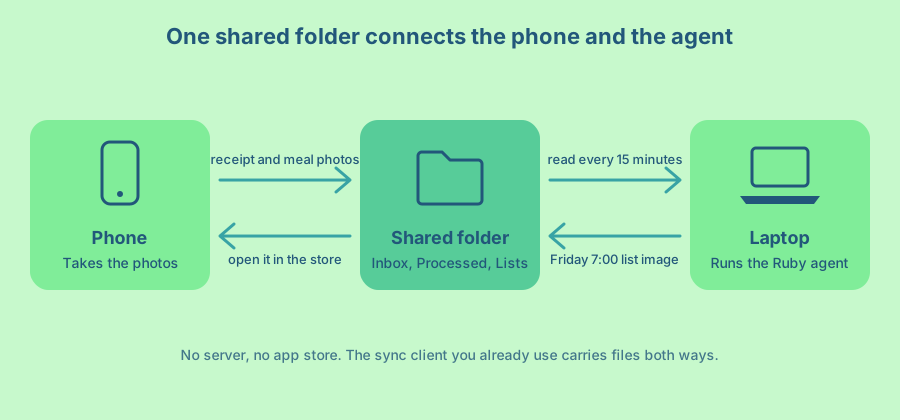
I like this design because there is nothing to host. You do not need a server, a domain, a login page or an app store review. The sync client you already use moves files in both directions, and the phone app for that service is the user interface. When the product proves useful, you can move the same Ruby code to a server later.
Inside the Ruby program there are two workflows. The first one runs every 15 minutes. It looks at each new photo, decides if it is a receipt, a meal or something else, reads the items and writes them to a ledger. The second one runs on Friday at 7:00. It works out what is running low, plans the shopping, writes a friendly list and draws it as a PNG image.
What an agent and a workflow mean here
People use the word “agent” for a lot of things, so here is what it means in this article. An agent is a language model with instructions and, optionally, tools (Ruby methods it may call). You ask it something. It either answers, or it asks to run a tool, reads the result and continues. This back and forth is called the agentic loop.
RubyLLM gives you a class for this called RubyLLM::Agent. You declare the model, instructions, tools and an output schema once, and then call ask anywhere. A workflow is the Ruby code that coordinates one or more of those agents. The RubyLLM guide says a workflow “is often a small Ruby class with a single public method, plus a loop you control.” There is no special framework to learn. If you can write a Ruby class, you can write a workflow.
We will use four patterns from that guide. Routing sends each photo to the right specialist. Structured output turns a photo into rows of data. A loop that we drive ourselves lets the planner call tools without running forever. A sequential workflow passes the plan from one agent to the next.
Set up the shared folder
Create a folder called Pantry in the cloud storage you already use. The agent creates the subfolders on its first run, so you only need the top one. On a Mac the folder lives at one of these paths.
iCloud Drive   ~/Library/Mobile Documents/com~apple~CloudDocs/Pantry
Dropbox        ~/Library/CloudStorage/Dropbox/Pantry
Google Drive   ~/Library/CloudStorage/GoogleDrive-you@example.com/My Drive/Pantry
Cloud storage apps like to save disk space by keeping only a placeholder on your laptop until you open a file. A program cannot read a placeholder, so tell the app to keep this folder on disk. In Finder, right-click the Pantry folder and choose “Keep Downloaded” for iCloud Drive or “Make available offline” for Dropbox. In Google Drive for desktop, right-click the folder and choose “Available offline”, or switch Drive to mirror mode.
On the phone, the flow is two taps. On an iPhone, take the photo, tap Share, choose “Save to Files” and pick Pantry/Inbox. On Android, share the photo to the Drive or Dropbox app and upload it to Pantry/Inbox. If you want one tap, an iOS Shortcut or an Android share target can save straight into the inbox, but the share sheet is enough to start.
The finished folder looks like this.
Pantry/
  Inbox/        photos from the phone land here
  Processed/    photos the agent has read, sorted by kind
  Lists/        the Friday shopping list images
  Data/         the ledger the agent keeps
Set up the Ruby project
You need Ruby 3.2 or newer, and libvips for images. libvips reads the HEIC photos that iPhones save, shrinks them and turns SVG drawings into PNG files. On a Mac, Homebrew installs it with support for both.
brew install vips
mkdir -p ~/pantry-agent/bin ~/pantry-agent/lib/pantry/agents ~/pantry-agent/lib/pantry/tools
cd ~/pantry-agent
The Gemfile has two gems. RubyLLM brings the agents and Schematist, its schema builder. ruby-vips is the Ruby binding for libvips.
# Gemfile
source "https://rubygems.org"

gem "ruby_llm", "~> 2.0"
gem "ruby-vips", "~> 2.3"
Run bundle install, then create a .env file with your API key and the folder path. Keep this file out of Git, because the key is a password.
# .env
export ANTHROPIC_API_KEY="sk-ant-..."
export PANTRY_FOLDER="$HOME/Library/Mobile Documents/com~apple~CloudDocs/Pantry"
The entry file loads the gems, picks the models and loads the rest of the code in order.
# lib/pantry.rb
require "cgi"
require "date"
require "digest"
require "fileutils"
require "json"
require "tmpdir"
require "ruby_llm"
require "vips"

module Pantry
  MODEL = ENV.fetch("PANTRY_MODEL", "claude-sonnet-5")
  FAST_MODEL = ENV.fetch("PANTRY_FAST_MODEL", "claude-haiku-4-5")
end

RubyLLM.configure do |config|
  config.anthropic_api_key = ENV["ANTHROPIC_API_KEY"]
  config.default_model = Pantry::MODEL
end

require_relative "pantry/folder"
require_relative "pantry/photo"
require_relative "pantry/ledger"
require_relative "pantry/stock"
require_relative "pantry/agents/photo_sorter"
require_relative "pantry/agents/item_readers"
require_relative "pantry/tools/pantry_stock"
require_relative "pantry/tools/recent_meals"
require_relative "pantry/agents/shopping_planner"
require_relative "pantry/agents/list_writer"
require_relative "pantry/list_card"
require_relative "pantry/process_photos"
require_relative "pantry/weekly_list"
There are two models on purpose. The fast model does the cheap and simple jobs, like sorting a photo or formatting a list. The main model does the jobs that need more judgement, like reading a crumpled receipt or planning a week. Both need to accept images. I use Anthropic models here, but RubyLLM supports many providers, so you can switch by setting a different API key and model name. Pick models that are listed with vision and structured output support on the RubyLLM models page.
Find the new photos
The Folder class knows the layout of the shared folder. Its most important job is to decide which photos are ready to read.
# lib/pantry/folder.rb
module Pantry
  # The shared folder that both the phone and the laptop can see.
  #
  #   Pantry/
  #     Inbox/        photos from the phone land here
  #     Processed/    photos the agent has read, sorted by kind
  #     Lists/        the Friday shopping list images
  #     Data/         the ledger the agent keeps
  class Folder
    PHOTO_TYPES = %w[.jpg .jpeg .png .heic .heif .webp].freeze
    SETTLE_SECONDS = 60

    def initialize(root)
      @root = File.expand_path(root)
    end

    def inbox = dir("Inbox")
    def lists = dir("Lists")
    def ledger_path = File.join(dir("Data"), "ledger.jsonl")

    # Photos that finished syncing. A file that changed in the last minute
    # may still be downloading, so it waits for the next run.
    def new_photos
      Dir.children(inbox)
         .map { |name| File.join(inbox, name) }
         .select { |path| PHOTO_TYPES.include?(File.extname(path).downcase) }
         .select { |path| Time.now - File.mtime(path) > SETTLE_SECONDS }
         .sort_by { |path| File.mtime(path) }
    end

    def archive(photo, kind)
      FileUtils.mv(photo, File.join(dir("Processed", kind), File.basename(photo)))
    end

    private

    def dir(*parts)
      File.join(@root, *parts).tap { |path| FileUtils.mkdir_p(path) }
    end
  end
end
Two details matter here. First, the extension filter skips anything that is not a photo. iCloud shows a file that has not downloaded yet as a hidden .IMG_1234.HEIC.icloud placeholder, and the filter skips those too. Second, a photo has to sit still for a minute before the agent touches it. Sync clients write files in pieces, and reading half a JPEG gives the model a grey rectangle. Waiting one run is cheaper than a wrong answer.
After the agent reads a photo, archive moves it out of the inbox into Processed/receipt, Processed/meal or Processed/other. The inbox stays empty when everything works, and you can open the processed folders on your phone to see what the agent decided.
Get the photos ready for the model
A phone photo is often a 12 megapixel HEIC file. Most model APIs accept JPEG, PNG, GIF and WebP, and none of them need that many pixels to read a receipt. Large images also cost more, because the provider counts image size as input tokens. So every photo goes through one small step first.
# lib/pantry/photo.rb
module Pantry
  # Phones save HEIC files and big pixels. Models want JPEG or PNG, and they
  # do not need 12 megapixels to read a receipt.
  module Photo
    MAX_SIDE = 1600

    def self.prepare(path)
      out = File.join(Dir.tmpdir, "pantry-#{File.basename(path, '.*')}.jpg")
      Vips::Image.thumbnail(path, MAX_SIDE, height: MAX_SIDE, size: :down)
                 .write_to_file(out, Q: 85)
      out
    end
  end
end
Vips::Image.thumbnail fits the photo inside a 1600 by 1600 box, keeps the aspect ratio and never makes a small photo bigger (size: :down). It also turns the image upright based on the camera’s rotation flag, which matters because a sideways receipt is harder to read. The result is a temporary JPEG that the workflow deletes when it is done.
Keep a ledger
The agent needs memory that survives between runs. A database would work, but for one household a plain text file is easier to trust. Each line in Data/ledger.jsonl is one JSON object for one photo. You can open it on your phone, read it and fix a wrong line by hand.
# lib/pantry/ledger.rb
module Pantry
  # An append-only log of what came into the kitchen and what went out.
  # One JSON object per line, so it is easy to read, diff and fix by hand.
  class Ledger
    def initialize(path)
      @path = path
    end

    def record(kind:, title:, items:, source:, at:)
      entry = { kind:, title:, at: at.strftime("%F"), source:, items: }
      File.open(@path, "a") { |file| file.puts(JSON.generate(entry)) }
    end

    def seen?(source)
      entries.any? { |entry| entry["source"] == source }
    end

    def entries
      return [] unless File.exist?(@path)

      File.readlines(@path, chomp: true).reject(&:empty?).map { |line| JSON.parse(line) }
    end
  end
end
A line in the ledger looks like this.
{
  "kind": "receipt",
  "title": "FreshCo",
  "at": "2026-10-03",
  "source": "ac39ecc3…",
  "items": [
    { "name": "milk", "quantity": 4000, "unit": "ml" },
    { "name": "egg", "quantity": 12, "unit": "count" }
  ]
}
The source field is the SHA-256 fingerprint of the photo file. If the laptop crashes after writing the line but before moving the photo, the next run finds the same fingerprint and does not count the groceries twice. If you share the same photo twice by mistake, the second copy goes to Processed/duplicate.
The first agent sorts the photos
Every photo starts with one question. Is this a receipt, a meal or something else? This is the routing pattern from the RubyLLM guide. A small, fast model classifies the input, and Ruby picks the specialist that handles it.
# lib/pantry/agents/photo_sorter.rb
module Pantry
  class PhotoSorter < RubyLLM::Agent
    model FAST_MODEL
    instructions <<~PROMPT
      You sort photos for a household pantry tracker.
      A "receipt" is a paper bill or an order confirmation for groceries or household supplies.
      A "meal" is food that someone cooked, is cooking or is eating, including ingredients laid out on a counter.
      Anything else is "other".
    PROMPT
    schema do
      string :kind, enum: %w[receipt meal other]
    end
  end
end
The schema block is what makes this reliable. Without it, the model might answer “This looks like a receipt from a grocery store!”, and you would need to parse that sentence. With it, RubyLLM asks the provider for structured output, and the answer is always JSON with a kind that is one of the three values. You read it with .parsed["kind"].
The instructions describe each category in one sentence, including two edge cases worth naming. An online order confirmation is a receipt. Raw ingredients on a counter count as a meal, because they are about to be used.
Two readers turn photos into rows
The receipt reader and the meal reader do similar work, so they share a schema and a set of naming rules. Consistent names are the hardest part of this product. If one receipt says “2% MILK 4L”, another says “Milk bag” and a meal photo says “whole milk”, the agent thinks you have three different things and the math falls apart.
# lib/pantry/agents/item_readers.rb
module Pantry
  ITEM_RULES = <<~RULES
    Write each item name in lowercase, singular and generic, such as "milk", "egg", "basmati rice" or "dish soap".
    Leave brands, sizes and prices out of the name.
    Use only these units: "count" for things you count, "g" for weight and "ml" for volume.
    Convert kilograms to g and litres to ml. A 4 L bag of milk is 4000 ml. A dozen eggs is 12 count.
    When an item is the same thing as one of the known items, reuse that exact name and unit.
  RULES

  class ItemsSchema < Schematist::Schema
    string :title, description: "The store name for a receipt, or the dish name for a meal"
    array :items do
      object do
        string :name
        number :quantity
        string :unit, enum: %w[count g ml]
      end
    end
  end

  class ReceiptReader < RubyLLM::Agent
    inputs :known_items
    schema ItemsSchema
    instructions do
      <<~PROMPT
        You read grocery receipts and list what was bought.
        Skip bags, deposits, discounts, taxes and anything that is not food or a household supply.
        If an item appears on several lines, add the quantities together.
        #{ITEM_RULES}
        Known items: #{known_items.join(', ')}
      PROMPT
    end
  end

  class MealReader < RubyLLM::Agent
    inputs :known_items
    schema ItemsSchema
    instructions do
      <<~PROMPT
        You look at a photo of a meal and estimate which pantry items were used to make it.
        Count the servings you can see and estimate the amount of each ingredient for those servings.
        Be conservative. A small guess is better than a big one.
        Skip water, salt, pepper and spices that are used by the pinch.
        #{ITEM_RULES}
        Known items: #{known_items.join(', ')}
      PROMPT
    end
  end
end
Three ideas keep the names stable. The first is a short list of rules with examples, because models follow examples better than abstract rules. The second is a fixed set of units, enforced by the enum in the schema, so the model cannot invent “bag” or “carton”. The third is the list of known items.
inputs :known_items declares a value that you pass in when you create the agent, like ReceiptReader.new(known_items: [...]). Because instructions is given as a block, it runs at that moment and can use the value. On the first receipt the list is empty. From then on, every reader sees names like milk (ml) and egg (count) and reuses them. The vocabulary of your kitchen grows from your own receipts.
ItemsSchema is a Schematist class, which is the same builder that the inline schema do block uses. Defining it once and passing it to both agents keeps them in step. RubyLLM turns it into JSON Schema for the provider, and the answer comes back as a Ruby hash.
The meal reader is the least precise part of the product, and I would rather say that up front. A photo of a bowl of dal does not tell you whether it took 150 or 200 grams of lentils. The instructions ask for conservative guesses, because underestimating use only means you buy a little later, while overestimating fills your list with things you already have. Over a few weeks the receipts correct the drift, since you cannot buy rice you did not run out of.
Put the photo workflow together
Now the pieces meet. ProcessPhotos is a workflow in the RubyLLM sense, a plain Ruby class with one public method.
# lib/pantry/process_photos.rb
module Pantry
  # Reads every new photo in the inbox: sort it, read it, write it down, file it.
  class ProcessPhotos
    READERS = { "receipt" => ReceiptReader, "meal" => MealReader }.freeze

    def initialize(folder:, ledger:)
      @folder = folder
      @ledger = ledger
    end

    def call
      @folder.new_photos.each { |photo| process(photo) }
    end

    private

    def process(photo)
      source = Digest::SHA256.file(photo).hexdigest
      return @folder.archive(photo, "duplicate") if @ledger.seen?(source)

      image = Photo.prepare(photo)

      RubyLLM.workflow("Read photo") do |workflow|
        kind = workflow.step("Sort") { PhotoSorter.new.ask("What kind of photo is this?", with: image).parsed["kind"] }

        if (reader = READERS[kind])
          known_items = Stock.new(@ledger).known_items
          result = workflow.step("Read") { reader.new(known_items:).ask("List the items in this photo.", with: image).parsed }
          @ledger.record(kind:, title: result["title"], items: result["items"], source:, at: File.mtime(photo))
        end

        @folder.archive(photo, kind)
        puts "#{File.basename(photo)}: #{kind}"
      end
    rescue RubyLLM::Error => e
      warn "#{File.basename(photo)} stays in the inbox for the next run: #{e.message}"
    ensure
      FileUtils.rm_f(image) if image
    end
  end
end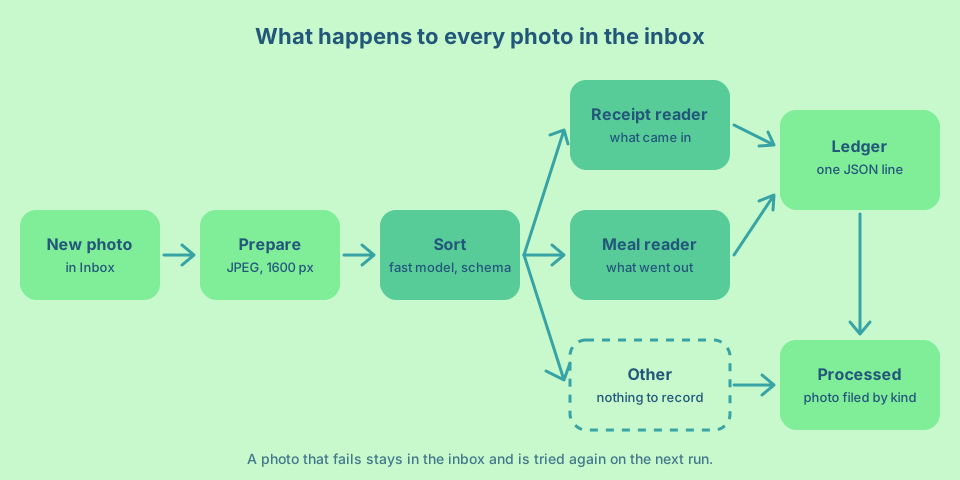
The routing is a hash. READERS[kind] gives the reader class for a receipt or a meal, and nil for anything else, so an “other” photo goes straight to the archive. Adding a new kind later, like a photo of the fridge, means one new agent and one new line in the hash.
ask(..., with: image) attaches the photo to the message. RubyLLM detects the file type and sends it in the format the provider expects. The same call works with OpenAI, Gemini or Anthropic.
RubyLLM.workflow and workflow.step do not change how the code runs. They label the model calls so that, if you turn on RubyLLM’s instrumentation, you see “Read photo” with its “Sort” and “Read” steps as one unit. It costs nothing to add now, and it helps a lot the day a receipt comes out wrong and you want to know which step made the mistake.
Errors are handled at the level of one photo. If the provider is down or rate limits you, RubyLLM raises an error that inherits from RubyLLM::Error. The photo stays in the inbox, the log says why, and the next run tries again. Other photos in the same run are not affected.
Let Ruby do the math
Before the planner can decide what to buy, someone has to subtract what you used from what you bought. That someone should not be the language model. Models are good at judgement and bad at arithmetic over a long list of numbers. Ruby is the opposite, so it gets this part.
# lib/pantry/stock.rb
module Pantry
  # Plain arithmetic over the ledger. The model gets these numbers, it does
  # not have to invent them.
  class Stock
    LOOKBACK_WEEKS = 4

    def initialize(ledger, today: Date.today)
      @entries = ledger.entries
      @today = today
    end

    def report
      rows.values.map do |row|
        {
          name: row[:name],
          unit: row[:unit],
          on_hand: [row[:bought] - row[:used], 0].max.round(1),
          weekly_use: (row[:used_recently] / weeks).round(1),
          times_bought_recently: row[:times_bought_recently],
          last_bought: row[:last_bought]&.to_s
        }
      end.sort_by { |row| row[:name] }
    end

    def known_items
      rows.values.map { |row| "#{row[:name]} (#{row[:unit]})" }.sort
    end

    private

    def rows
      @rows ||= @entries.each_with_object({}) do |entry, rows|
        date = Date.parse(entry["at"])
        recent = date >= since

        entry["items"].each do |item|
          row = rows[[item["name"], item["unit"]]] ||= blank_row(item)
          quantity = item["quantity"].to_f

          if entry["kind"] == "receipt"
            row[:bought] += quantity
            row[:times_bought_recently] += 1 if recent
            row[:last_bought] = [row[:last_bought], date].compact.max
          else
            row[:used] += quantity
            row[:used_recently] += quantity if recent
          end
        end
      end
    end

    def blank_row(item)
      { name: item["name"], unit: item["unit"], bought: 0.0, used: 0.0,
        used_recently: 0.0, times_bought_recently: 0, last_bought: nil }
    end

    def since = @today - (LOOKBACK_WEEKS * 7)

    # In the first weeks there is less history, so divide by what we have.
    def weeks
      first = @entries.map { |entry| Date.parse(entry["at"]) }.min || @today
      ((@today - first).to_f / 7).clamp(1, LOOKBACK_WEEKS)
    end
  end
end
For each item, report gives the amount on hand, the average use per week over the last four weeks, how often you bought it in that time and when you last bought it. Here is a piece of real output from my test ledger.
[
  {
    "name": "basmati rice",
    "unit": "g",
    "on_hand": 1700.0,
    "weekly_use": 161.5,
    "times_bought_recently": 1,
    "last_bought": "2026-09-26"
  },
  {
    "name": "dish soap",
    "unit": "count",
    "on_hand": 1.0,
    "weekly_use": 0.0,
    "times_bought_recently": 1,
    "last_bought": "2026-09-26"
  },
  {
    "name": "egg",
    "unit": "count",
    "on_hand": 6.0,
    "weekly_use": 3.2,
    "times_bought_recently": 1,
    "last_bought": "2026-09-26"
  }
]
Two choices keep the numbers sensible. on_hand never goes below zero, because a meal can use something you bought before you started tracking. And weeks divides by the real length of your history in the first month, so a two-week-old ledger does not look like you eat half as much as you do.
Notice the dish soap. It has a weekly use of zero, because nobody photographs their dish soap. Staples like that are where the planner’s judgement comes in, through times_bought_recently and last_bought.
Give the planner tools
The planner needs to see the stock and the recent meals. You could paste both into the prompt. I give them to the planner as tools instead, so it decides what to look at, and so the same tools work when the pantry has 300 items and a prompt would get long.
# lib/pantry/tools/pantry_stock.rb
module Pantry
  class PantryStock < RubyLLM::Tool
    description "Lists every tracked pantry item with the amount on hand, the average use per week, " \
                "how many times it was bought in the last four weeks and the date it was last bought."

    def initialize(stock)
      @stock = stock
    end

    def execute
      @stock.report
    end
  end
end
# lib/pantry/tools/recent_meals.rb
module Pantry
class RecentMeals < RubyLLM::Tool
description "Lists the meals from photos in the last few days, newest first, with the items each one used."
parameter :days, type: :integer, description: "How many days to look back, from 1 to 28", required: false
def initialize(ledger, today: Date.today)
@ledger = ledger
@today = today
end
def execute(days: 14)
since = @today - days.to_i.clamp(1, 28)
@ledger.entries
.select { |entry| entry["kind"] == "meal" && Date.parse(entry["at"]) >= since }
.reverse
.map { |entry| { date: entry["at"], dish: entry["title"], items: entry["items"] } }
end
end
endA RubyLLM tool is a class with a description and an execute method. The description is written for the model, so it says what comes back and when the tool is useful. The model reads it and decides whether to call the tool. When it does, RubyLLM runs execute with the arguments the model chose and sends back whatever it returns. A hash or an array is sent as JSON.
Both tools take their data through initialize. The RubyLLM docs call this custom initialization, and it is how you give a tool access to your objects without global variables. RecentMeals also takes a days argument from the model. Arguments come from the model, so treat them as untrusted input. Here clamp(1, 28) keeps the value in a safe range whatever the model sends.
The planner and the agentic loop
Here is the agent that does the thinking on Friday.
# lib/pantry/agents/shopping_planner.rb
module Pantry
  class ShoppingPlanner < RubyLLM::Agent
    inputs :stock, :ledger, :today
    tools { [PantryStock.new(stock), RecentMeals.new(ledger, today:)] }
    instructions do
      <<~PROMPT
        You plan the weekly grocery shopping for a household. Today is #{today.strftime('%A, %d %b %Y')}.
        Check the pantry stock and the recent meals before you decide anything.
        Buy enough of each item for the next 7 days plus a small buffer, minus what is on hand.
        Some staples never show up in meal photos (dish soap, toilet paper, coffee). Add one when it was
        bought regularly and its last purchase suggests it is running out.
        Leave out anything with enough on hand. Round up to the sizes stores sell.
        Reply with one line per item in the form "name, quantity, reason". No other text.
      PROMPT
    end
  end
end
tools takes a block here, for the same reason instructions does. The tools need the stock and the ledger, and those only exist when the agent is created. The instructions tell the planner to look before it decides, give it a simple rule for quantities (a week plus a buffer, minus what is on hand) and explain the staples problem in plain words. The “reason” in each line is for you. When the list surprises you, the plan in the log tells you why the agent added an item.
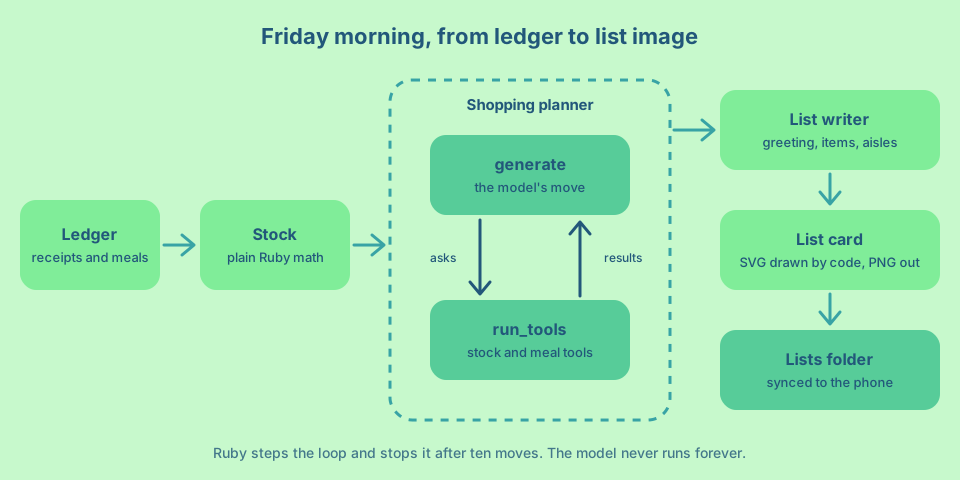
If you call planner.ask(...), RubyLLM runs the whole agentic loop for you. It calls the model, runs any tools the model asks for, calls the model again with the results, and repeats until the model answers without asking for a tool. That is fine most of the time. But a job that runs unattended on a Friday morning should have a limit. If the model keeps calling tools because of a bug in a tool or a confusing prompt, you want it to stop, not to spend money until the provider gives up.
The RubyLLM guide shows how to drive the loop yourself. ask_later adds your message without sending it. step makes the next move, which is either generate (the model’s move) or run_tools (your move, running the tools it asked for). complete? is true when the model answered without calling a tool. So the loop is “step until complete”, and you can count the steps.
Write the list
The planner’s answer is plain text made for reasoning, not for reading in a store. A second agent turns it into a list. This is the sequential pattern, where the output of one agent is the input of the next.
# lib/pantry/agents/list_writer.rb
module Pantry
  class ListWriter < RubyLLM::Agent
    AISLES = %w[produce dairy bakery meat pantry frozen household other].freeze

    model FAST_MODEL
    inputs :today
    instructions do
      <<~PROMPT
        You turn a shopping plan into a list that someone reads on a phone in a store.
        Write a warm, short greeting for #{today.strftime('%A')} morning, at most 10 words.
        Write each quantity the way a shopper says it, such as "2 L", "1 kg", "a dozen" or "3".
        Put each item in the store aisle where it is usually found.
        End with one friendly sentence of at most 16 words, such as a tip for the week.
      PROMPT
    end
    schema do
      string :greeting
      array :items do
        object do
          string :name
          string :quantity
          string :aisle, enum: AISLES
        end
      end
      string :note
    end
  end
end
Why two agents instead of one? Each one has a simpler job and a better fit. The planner needs tools and a capable model. The writer needs a strict output shape and nothing else, so it runs on the fast model with a schema. Splitting them also keeps the units straight. The planner thinks in the ledger’s grams and millilitres, and the writer turns 4000 ml into “4 L”, which is how a person reads it.
The aisles are an enum for the same reason the units were. The image groups items by aisle in a fixed order, so the model has to pick from the list it knows about.
Draw the list as an image
The last step turns the list into a PNG that looks good on a phone. You might expect an image model to draw it, and RubyLLM can call one with RubyLLM.paint. I do not recommend it for this job. Image models are good at pictures and still unreliable at exact text. A shopping list where “paneer” turns into “panner” is a bad shopping list. So the model writes the words, and code draws them.
The drawing is an SVG built from a Ruby string, in the same colours as this website. libvips turns it into a PNG at twice the size, so it stays sharp on high density phone screens.
# lib/pantry/list_card.rb
module Pantry
  # Draws the shopping list as an SVG and turns it into a PNG for the phone.
  # Code draws the text, so every letter is exactly what the model wrote.
  class ListCard
    WIDTH = 1080
    INK = "#22577a"
    ACCENT = "#38a3a5"
    CALLOUT = "#57cc99"
    ACTION = "#80ed99"
    PAPER = "#c7f9cc"
    SERIF = "Fraunces, Georgia, serif"
    SANS = "Inter, Helvetica, Arial, sans-serif"

    def initialize(list, date:)
      @list = list
      @date = date
    end

    def save(path)
      Vips::Image.new_from_buffer(svg, "", scale: 2).write_to_file(path)
      path
    end

    def svg
      greeting_lines = wrap(@list["greeting"], 24).first(3)
      subtitle_y = 230 + (greeting_lines.size * 76) - 12
      body, y = rows(top: subtitle_y + 50)
      note_lines = wrap(@list["note"], 46).first(2)
      height = y + 120 + (note_lines.size * 48)

      <<~SVG
        <svg xmlns="http://www.w3.org/2000/svg" width="#{WIDTH}" height="#{height}" viewBox="0 0 #{WIDTH} #{height}">
          <rect width="100%" height="100%" fill="#{PAPER}"/>
          <circle cx="#{WIDTH - 60}" cy="40" r="260" fill="#{ACTION}" opacity="0.55"/>
          <circle cx="40" cy="#{height - 30}" r="220" fill="#{CALLOUT}" opacity="0.35"/>
          <text x="80" y="140" font-family="#{SANS}" font-size="30" font-weight="600" fill="#{ACCENT}" letter-spacing="3">#{text(@date.strftime('%A, %d %b %Y').upcase)}</text>
          #{lines(greeting_lines, y: 230, step: 76, attributes: %(font-family="#{SERIF}" font-size="68" font-weight="600"))}
          <text x="80" y="#{subtitle_y}" font-family="#{SANS}" font-size="30" fill="#{INK}" opacity="0.75">#{@list['items'].size} things to pick up this week</text>
          #{body}
          #{lines(note_lines, y: y + 100, step: 48, attributes: %(font-family="#{SERIF}" font-size="34" font-style="italic"))}
        </svg>
      SVG
    end

    private

    def lines(strings, y:, step:, attributes:)
      strings.each_with_index.map do |line, index|
        %(<text x="80" y="#{y + (index * step)}" #{attributes} fill="#{INK}">#{text(line)}</text>)
      end.join("\n")
    end

    def rows(top:)
      y = top
      parts = []

      grouped.each do |aisle, items|
        y += 70
        parts << %(<text x="80" y="#{y}" font-family="#{SANS}" font-size="26" font-weight="700" fill="#{ACCENT}" letter-spacing="2">#{text(aisle.upcase)}</text>)
        items.each do |item|
          y += 84
          parts << item_row(item, y)
        end
      end

      [parts.join("\n"), y]
    end

    def item_row(item, y)
      <<~ROW
        <rect x="64" y="#{y - 58}" width="#{WIDTH - 128}" height="72" rx="20" fill="#ffffff" opacity="0.55"/>
        <circle cx="116" cy="#{y - 22}" r="16" fill="none" stroke="#{ACCENT}" stroke-width="4"/>
        <text x="156" y="#{y - 10}" font-family="#{SANS}" font-size="36" fill="#{INK}">#{text(item['name'].capitalize[0, 30])}</text>
        <rect x="#{WIDTH - 264}" y="#{y - 48}" width="176" height="52" rx="26" fill="#{ACTION}"/>
        <text x="#{WIDTH - 176}" y="#{y - 12}" text-anchor="middle" font-family="#{SANS}" font-size="28" font-weight="600" fill="#{INK}">#{text(item['quantity'][0, 10])}</text>
      ROW
    end

    def grouped
      @list["items"].group_by { |item| item["aisle"] }
                    .sort_by { |aisle, _| ListWriter::AISLES.index(aisle) || ListWriter::AISLES.size }
    end

    def wrap(string, width)
      string.split.each_with_object([+""]) do |word, lines|
        lines << +"" if lines.last.length + word.length + 1 > width && !lines.last.empty?
        lines.last << " " unless lines.last.empty?
        lines.last << word
      end
    end

    def text(string) = CGI.escapeHTML(string.to_s)
  end
end
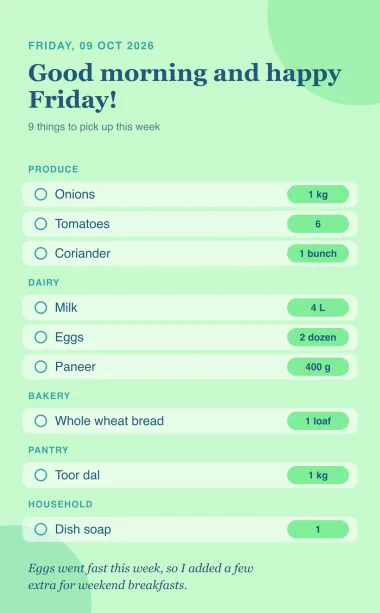
The card has the date at the top, the greeting in a large serif, a count of items, then one rounded row per item with an empty circle to tick in your head and the quantity in a green pill. Items are grouped by aisle, in the order you walk through most stores. The note from the writer sits at the bottom. The height grows with the list, so ten items and thirty items both fit.
Every string from the model goes through text, which escapes characters like & and <. Without it, an item called “salt & pepper” would break the SVG. Long names and quantities are cut to a safe length so they cannot run off the card. The fonts are the ones this site uses, with common fallbacks for a laptop where they are not installed.
This is what lands in the Lists folder.
Friday morning in one class
WeeklyList puts the Friday steps in order and holds the loop with its limit.
# lib/pantry/weekly_list.rb
module Pantry
  # Friday morning: plan the shopping, write the list, draw it, drop it in the folder.
  class WeeklyList
    MAX_STEPS = 10

    def initialize(folder:, ledger:, today: Date.today)
      @folder = folder
      @ledger = ledger
      @today = today
    end

    def call
      RubyLLM.workflow("Weekly shopping list") do |workflow|
        plan = workflow.step("Plan") { plan_shopping }
        list = workflow.step("Write") { ListWriter.new(today: @today).ask(plan).parsed }
        workflow.step("Draw") do
          ListCard.new(list, date: @today).save(File.join(@folder.lists, "shopping-list-#{@today}.png"))
        end
      end
    end

    private

    # The same loop `ask` runs, one move at a time, with a hard stop.
    def plan_shopping
      planner = ShoppingPlanner.new(stock: Stock.new(@ledger, today: @today), ledger: @ledger, today: @today)
      planner.ask_later("Plan the shopping for the week that starts today.")

      MAX_STEPS.times do
        break if planner.complete?

        planner.step
      end
      raise "The planner did not finish in #{MAX_STEPS} steps" unless planner.complete?

      planner.messages.last.content
    end
  end
end
plan_shopping is the agentic loop with a budget. A normal Friday should take three or four steps. The model asks for the stock, then the meals (sometimes both at once), then writes the plan. Ten steps leave plenty of room. If the planner is still going after ten, the method raises an error, the job stops and the log says why. You lose one list, not your API budget.
Each step in the workflow returns the value of its block, so plan is the planner’s text, list is the writer’s hash and the last step returns the path of the PNG. The file name has the date in it, so last week’s list stays in the folder until you delete it.
A command to run it
One small script is the front door for both workflows.
#!/usr/bin/env ruby
# bin/pantry
require_relative "../lib/pantry"

folder = Pantry::Folder.new(ENV.fetch("PANTRY_FOLDER"))
ledger = Pantry::Ledger.new(folder.ledger_path)

# Two scheduled jobs can wake up at the same minute. Only one runs at a time.
File.open(File.join(Dir.tmpdir, "pantry.lock"), File::CREAT) do |lock|
  lock.flock(File::LOCK_EX)

  case ARGV.first
  when "photos"
    Pantry::ProcessPhotos.new(folder:, ledger:).call
  when "list"
    Pantry::ProcessPhotos.new(folder:, ledger:).call
    puts Pantry::WeeklyList.new(folder:, ledger:).call
  else
    abort "Usage: bin/pantry photos|list"
  end
end
bin/pantry photos reads the inbox. bin/pantry list reads the inbox first, so a receipt you shared at 6:55 still counts, and then makes the list. The file lock matters because both jobs can start at 7:00 on a Friday. Without it, two processes could read the same photo at the same time and write it to the ledger twice. With it, the second one waits for the first to finish and then finds nothing new to do.
Make it executable and try it by hand before you schedule anything.
chmod +x bin/pantry
source .env
bundle exec bin/pantry photos
bundle exec bin/pantry list
Share a receipt and a meal photo to the inbox, wait a minute for them to settle, and run photos. You should see a line per photo, a new line per photo in Data/ledger.jsonl and the photos in their Processed folders. Then run list and open the Lists folder on your phone. If something looks wrong, run it again with RUBYLLM_DEBUG=true in front, and RubyLLM prints every request, tool call and tool result.
Run it on a schedule
On a Mac, the right tool for scheduled jobs is launchd. Each job is a small plist file in ~/Library/LaunchAgents. The first one reads the inbox every 15 minutes (900 seconds).
<?xml version="1.0" encoding="UTF-8"?>
<!DOCTYPE plist PUBLIC "-//Apple//DTD PLIST 1.0//EN" "http://www.apple.com/DTDs/PropertyList-1.0.dtd">
<plist version="1.0">
<dict>
<key>Label</key>
<string>com.example.pantry.photos</string>
<key>ProgramArguments</key>
<array>
<string>/bin/zsh</string>
<string>-lc</string>
<string>cd ~/pantry-agent && source .env && bundle exec bin/pantry photos</string>
</array>
<key>StartInterval</key>
<integer>900</integer>
<key>StandardOutPath</key>
<string>/tmp/pantry.log</string>
<key>StandardErrorPath</key>
<string>/tmp/pantry.log</string>
</dict>
</plist>The second one runs on Friday at 7:00. In launchd, weekday 5 is Friday (0 and 7 are both Sunday).
<?xml version="1.0" encoding="UTF-8"?>
<!DOCTYPE plist PUBLIC "-//Apple//DTD PLIST 1.0//EN" "http://www.apple.com/DTDs/PropertyList-1.0.dtd">
<plist version="1.0">
<dict>
<key>Label</key>
<string>com.example.pantry.list</string>
<key>ProgramArguments</key>
<array>
<string>/bin/zsh</string>
<string>-lc</string>
<string>cd ~/pantry-agent && source .env && bundle exec bin/pantry list</string>
</array>
<key>StartCalendarInterval</key>
<dict>
<key>Weekday</key>
<integer>5</integer>
<key>Hour</key>
<integer>7</integer>
<key>Minute</key>
<integer>0</integer>
</dict>
<key>StandardOutPath</key>
<string>/tmp/pantry.log</string>
<key>StandardErrorPath</key>
<string>/tmp/pantry.log</string>
</dict>
</plist>The command runs through a login shell (zsh -lc) so it finds the same Ruby you use in the terminal, whether it comes from Homebrew, rbenv or another version manager. Load both jobs, and start the list job once to check that it works from launchd too.
cp com.example.pantry.*.plist ~/Library/LaunchAgents/
launchctl bootstrap gui/$(id -u) ~/Library/LaunchAgents/com.example.pantry.photos.plist
launchctl bootstrap gui/$(id -u) ~/Library/LaunchAgents/com.example.pantry.list.plist
launchctl kickstart gui/$(id -u)/com.example.pantry.list
tail -f /tmp/pantry.log
A laptop is often asleep at 7:00. launchd handles that well. Its manual (man launchd.plist) says that unlike cron, which skips a job while the computer sleeps, launchd starts it the next time the computer wakes up. So the list arrives when you open the lid, which is before you leave for the store anyway.
If the log says “Operation not permitted” when it reads the folder, macOS is protecting your cloud storage from background programs. Open System Settings, go to Privacy & Security, then Full Disk Access, and add the Ruby binary that ruby -e 'puts RbConfig.ruby' prints. On Linux, cron does the same job as launchd with two lines.
*/15 * * * * cd ~/pantry-agent && . ./.env && bundle exec bin/pantry photos >> ~/pantry.log 2>&1
0 7 * * 5   cd ~/pantry-agent && . ./.env && bundle exec bin/pantry list >> ~/pantry.log 2>&1
What it costs and what to watch
Every photo costs two model calls (sort and read), and Friday costs a few more. The total depends on your provider, your models and how many photos you take, so I will not guess a number for you. Measure it instead. Every RubyLLM response has a cost, and an agent keeps a running total.
reader = ReceiptReader.new(known_items: [])
reader.ask("List the items in this photo.", with: "receipt.jpg")
puts reader.cost.total
Shrinking photos to 1600 pixels and using the fast model for sorting and formatting keep the cost down. Running the planner on the fast model as well is worth a try once your ledger is stable.
Privacy deserves a sentence too. Receipt photos can show your store, your card’s last digits and sometimes your name. They go to your model provider, so read its data retention policy, and crop the bottom of the receipt if that part worries you.
These are the problems I would expect in the first weeks, and how to handle them.
- Item names drift, so “coriander” and “cilantro” become two items. Open
ledger.jsonland replace one name with the other. The next run picks up the fix, because the known items list comes from the ledger. - A meal estimate is far off. Edit the quantity in the ledger line for that meal. The ledger is the source of truth and Ruby recomputes everything from it.
- The list misses something you always buy. Add a line to the planner’s instructions, such as “We always keep two bags of rice.” Instructions are the cheapest place to teach the agent about your household.
- A photo stays in the inbox. Read
/tmp/pantry.log. The workflow writes the reason for every photo it could not read.
Where to take it next
The product is complete as it is, but the RubyLLM guide has patterns that fit the next steps well. The evaluator loop (one agent drafts, a critic agent checks the draft against clear rules) is a good fit for the list. A critic could check that nothing on the list has enough stock on hand and send it back with feedback. The parallel pattern fits the photo inbox. When you come back from a big shop with five receipts, Async can read them at the same time. And when you want the whole household to share it, the Rails integration stores chats and messages in a database, and the same agents run inside background jobs.
Before an agent like this talks to anyone outside your household, give it guardrails. I wrote a separate guide on how to build guardrails for AI Agents that puts checks before the model, around every tool and after every reply, with the same RubyLLM.
If you want to try it this week, here is the order I would follow.
- Create the
Pantryfolder, set it to stay on disk and save a test photo to the inbox from your phone. - Set up the project, write
Folder,PhotoandLedger, and check that photos move and lines appear. - Add the sorter and the readers, and feed them a week of receipts and meals.
- Add the stock, the tools, the planner, the writer and the card, then run
bin/pantry listby hand. - Load the two launchd jobs and let next Friday surprise you.
The first time the list shows up on your phone without you asking, it feels a little like magic. It is not magic, of course. It is a few hundred lines of Ruby, a folder and a model doing small jobs in a loop you control. That is all an AI Agent needs to be.