Flaky Rails system tests with Cuprite are almost always caused by timing, animations or shared state, and rarely by Cuprite itself. The fix is to make each test wait for something the user can see, turn off the animations that move things around, and find out what state leaks between tests. Adding a longer timeout or a sleep comes last, because it hides the problem and slows every run.
I am Ash, and I run browser tests for a Rails app every day. This article is for you if a test passes on your laptop, fails on CI and passes again when you rerun it. I will go through the causes in the order I check them. If you have not set up Cuprite yet, start with how to test in Chrome using Cuprite and come back.
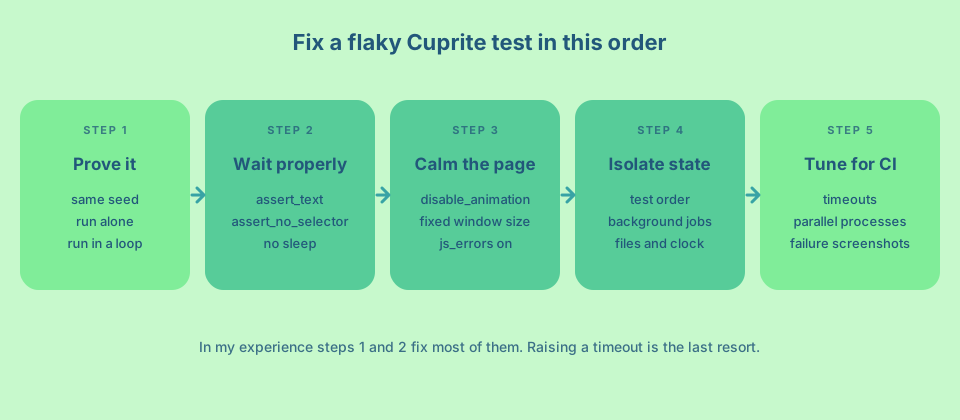
First, prove that the test is flaky
A flaky test is one that gives different results for the same code. Before you change anything, make it fail on purpose so you can tell when it is fixed.
Rails runs tests in random order, and the Rails testing guide says you can set the random seed with --seed. When a test fails on CI, copy the seed from the log and run it locally with the same seed. Then run the failing test alone. If it passes alone and fails with the rest of the suite, the cause is order or shared state. If it fails alone sometimes, the cause is timing.
For timing problems I run the single test in a loop until it fails.
for i in $(seq 1 20); do bin/rails test:system test/system/checkout_test.rb:12 || break; doneThe OpenProject team wrote a good guide on handling flaky tests. It makes the same point that a failing test should be run with the same seed and the same files as CI.
Wait for what the user can see
The most common cause is a check that runs before the page has finished changing. Capybara waits for you, but only when you use a method that waits. The Capybara README says the default wait is 2 seconds and that has_no_xpath? retries until that time passes, while !page.has_xpath? does not wait.
The same idea applies to the text checks I see most often.
# Checks once and moves on. Fails if the page is 50 ms behind.
click_button "Save"
assert page.has_text?("Saved")

# Retries until the text appears or the wait time runs out.
click_button "Save"
assert_text "Saved"
Waiting for something to disappear needs the same care. Use assert_no_selector ".spinner" and not assert_not page.has_selector?(".spinner"). In RSpec the matching forms are expect(page).to have_text("Saved") and expect(page).to have_no_selector(".spinner").
Also avoid reading a value out of the page and then comparing it in Ruby, such as find(".count").text == "3". That reads once. Let Capybara do the comparing with assert_selector ".count", text: "3" so it can retry.
Turbo needs a visible result to wait for
If your app uses Turbo, the response can arrive before the page is updated. OpenProject says that Turbo’s asynchronous rendering is the most frequent cause of flaky tests for them, because an assertion can see stale content between the response and the page update. The practical fix is to assert on the result, such as a flash message or a new heading, and not on the click having happened.
There is also a gem called capybara-lockstep that makes Capybara wait for page JavaScript and AJAX requests, and it supports Cuprite. Its README does not mention Turbo, so check that it fits your app before you depend on it.
Turn off animations
Cuprite clicks at the position where it finds the element. If a menu is still sliding in, the click can land on the wrong spot or on something that covers it. Capybara has a setting for this.
Capybara.disable_animation = trueAccording to the Capybara source, this adds a Rack middleware that injects CSS into the pages your test server returns. The CSS sets transition: none, animation-duration: 0s, animation-delay: 0s and scroll-behavior: auto on every element, and it turns off jQuery effects when jQuery is loaded. It only touches pages served by your app under test, so a third-party widget embedded in them is changed too.
Fix the window size and show JavaScript errors
A page that fits on a large desktop window can hide a button behind a menu on a small one. Ferrum, the library under Cuprite, starts Chrome with a window of 1024 by 768 unless you say otherwise (see the Ferrum customization docs). Your laptop and CI should use the same size, so set it once.
Capybara.register_driver(:cuprite) do |app|
  Capybara::Cuprite::Driver.new(
    app,
    window_size: [1400, 1000],
    js_errors: true
  )
end
With js_errors on, a JavaScript error on the page is raised in your Ruby test. Many “mystery” failures turn out to be an exception that stopped a script half way. The Cuprite README links to Ferrum’s docs for the full list of browser options. The Rails API lists screen_size and options as arguments for driven_by, but it only says that options are driver-specific. So I register the driver myself and keep the settings in one place, then call driven_by :cuprite as the Rails guide shows.
Look for state that leaks between tests
If a test passes alone and fails in the suite, something is shared. Check these in order.
Records can go missing when the test thread and the server thread use different database connections. The Capybara README says that Rails 5.1 and later share the connection safely, so on a modern Rails app this is rarely the cause. If you turned off transactional tests for some tests, you must clean the database yourself.
Background jobs are the next suspect. A job that runs later in another thread can finish before or after your assertion. Run jobs inline in tests, or assert on something the job produces and let Capybara wait for it.
Also look at files written to disk, uploads, cached values, a frozen clock that is never unfrozen and data created with a fixed name. One test leaving a record with the same email address is enough to break the next one.
Understand what changes on CI
CI is slower than your laptop, and it often runs tests in parallel. OpenProject describes running about 32 processes with a browser and a database for each, and says that this slowdown can cause synchronization failures. The same page says that the default wait is too short on slow CI.
So there are two timeouts to know about. Capybara waits 2 seconds by default for an assertion (Capybara.default_max_wait_time). Ferrum waits 5 seconds by default for the browser to reply to a command (timeout). Raise them only after the assertions are written correctly, and raise Capybara’s first, for example Capybara.default_max_wait_time = 5.
Ferrum has two more options that help here. pending_connection_errors is off by default, and when you turn it on Ferrum raises an error if the page is still waiting on slow responses at the timeout. The Cuprite README also shows page.driver.browser.network.wait_for_idle, which returns false if network connections are still active after the timeout.
If Chrome runs inside a container, the Cuprite README warns that turning off the sandbox with no-sandbox should not be done only because Docker is involved. It suggests a non-root user with a working sandbox when possible.
Debug with evidence
Rails already takes a screenshot of a failed system test. The guide says take_failed_screenshot is included in before_teardown, so you do not need to write your own teardown for it. Make sure your CI keeps that file as an artifact, because a screenshot you cannot open is no help.
When you need more, Cuprite has a few tools.
page.driver.debug(binding)pauses the test, opens Chrome and starts a console, so you can look at the page and try commands.slowmoadds a pause before each command, which makes a headless run easier to follow.save_screenshotandpage.htmlgive you the page at the moment you ask for it.
A short checklist
- Run the failing test with the same seed, alone and in a loop, so you can see it fail.
- Replace every immediate check (
has_text?,.text ==) with an assertion that waits. - Assert on the visible result of a Turbo update, not on the click.
- Set
Capybara.disable_animation = true. - Use one window size everywhere and turn on
js_errors. - Look for shared state in test order, jobs, files, the clock and fixed names.
- Keep failed screenshots from CI.
- Raise timeouts last.
Frequently asked questions
Is Cuprite the reason my system tests are flaky?
Usually not. Cuprite waits through Capybara in the same way other drivers do. Flaky results most often come from a check that does not wait, a moving page or state shared between tests.
Should I add sleep to my tests?
No. A fixed sleep slows every passing run and still fails when the work takes longer than the sleep. Wait for a visible result with an assertion such as assert_text.
How do I stop animations from breaking clicks?
Set Capybara.disable_animation = true in your test helper. It injects CSS that turns off transitions and animations in the pages your test server returns.
Why do my tests only fail on CI?
CI machines are slower and often run tests in parallel, so a race that never shows on your laptop appears. Reproduce the failure with the same seed, check that the window size matches and keep the failure screenshot.
How do I pause a Cuprite test and look at the page?
Call page.driver.debug(binding). The Cuprite README says this opens Chrome and starts a console at that point in the test.