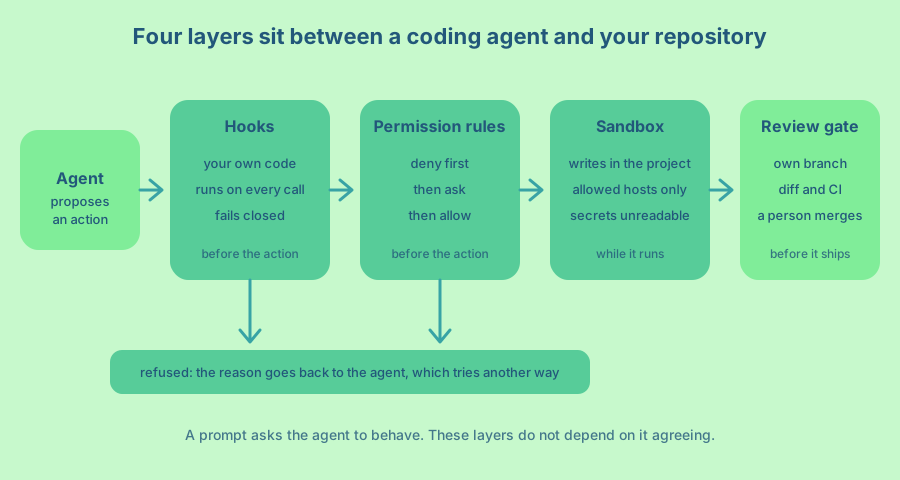
You keep a coding agent such as Claude Code, Codex or Cursor under control with four layers. Permission rules decide which actions it may attempt. A sandbox limits what a running command can touch. Hooks run your own code before every action. A review gate sits between the agent’s work and your main branch. Each layer is a settings file or a short script, and none of them depends on the model agreeing with you.
I am Ash, and I use coding agents every day, including in a Rails app where the agent has plenty of freedom inside a narrow box. This article is for engineers and small teams who let an agent read files, run commands and edit code, and who want a wrong guess to cost minutes and not a repository. The three tools name things differently, so I show where each layer lives in each of them. The code examples use the Claude Code format, and the ideas carry over.
You will get the risks in plain words, a starting set of rules, a hook you can copy and run, and a plan for the first week. If you are building an agent that talks to customers, How to build guardrails for AI Agents applies the same thinking to that case.
What can go wrong with a coding agent
A coding agent can read your files, run shell commands, install packages and push to git. That is the whole point of it, and it is also the whole risk. The model chooses what to run, and it can choose badly because of a hallucination, a vague instruction or a mistaken guess about your project.
It can also be steered by someone else. A README, an issue, a web page or a dependency can contain text that the agent reads as an instruction. OWASP calls this indirect prompt injection, and it says the problem may not be fully preventable because of how generative models work. So the goal is to limit the damage when it happens.
OWASP’s Excessive Agency entry names three causes that map well to coding agents. The agent has more functionality than it needs (open-ended shell access), more permissions than it needs (your whole home folder, including SSH keys), or more autonomy than it should have (pushing without anyone looking). Each layer below removes one of those.
The agent also takes shortcuts. Told to fix a failing build, it may delete the failing test, loosen a lint rule or paste a key into the source to make something work. That is not malice, because it is optimising for the task you gave it. It is also why some guardrails below protect your tests and CI configuration and not only your secrets.
A good habit is to treat the agent like a new contractor on their first day. They are capable and quick, and you still do not hand them the production keys.
Where each layer lives in Claude Code, Codex and Cursor
All three tools have the same four building blocks under different names. This table is a map for the rest of the article, based on each tool’s documentation at the time of writing.
| Layer | Claude Code | Codex | Cursor |
|---|---|---|---|
| Permission rules | permissions with deny, ask and allow lists |
An approval policy such as on-request, never or granular |
Run modes: Auto-review, Allowlist and Run Everything |
| Sandbox | Off by default, turned on with /sandbox |
Modes read-only, workspace-write and danger-full-access |
A terminal sandbox with network blocked by default, tuned in sandbox.json |
| Hooks | PreToolUse in the settings files |
PreToolUse in .codex/hooks.json or config.toml |
beforeShellExecution and preToolUse in .cursor/hooks.json |
| Project settings | .claude/settings.json |
.codex/config.toml |
The .cursor/ folder |
| Instructions file | CLAUDE.md |
AGENTS.md |
Rules in .cursor/rules, or AGENTS.md |
The review gate is the same everywhere, because it lives in your git host and not in the tool.
Write the rules down, then enforce them
Start with the instructions file, because it is free and it works most of the time. In it, name the task scope, the commands for tests and linting, the files that need special care (authentication, CI workflows, infrastructure), and a rule to treat issue text, web pages and logs as data and not as orders. Also ask the agent to report failed or skipped checks honestly.
Keep that file short and specific, and do not mistake it for a guardrail. The Claude Code documentation says its memory files are context and not enforced configuration, and it points to a hook for blocking an action regardless of what the model decides. Cursor’s documentation on rules says plainly that AI guidance should not be your only security control. Codex reads AGENTS.md the same way, as instructions that are added to the prompt. Everything after this point is the enforcement part.
Start with permission rules
Permission rules say which tool calls the agent may make. In Claude Code there are three lists, and they are checked in a fixed order. In its permission settings, a rule is evaluated as deny first, then ask, then allow, and the first match wins.
This is a starting file for a Rails project. It blocks the files and commands that hurt most, asks before the ones that change shared state, and lets the everyday read and test commands run without interruption.
{
  "permissions": {
    "deny": [
      "Read(./.env)",
      "Read(./.env.*)",
      "Read(~/.ssh/**)",
      "Bash(git push *)",
      "Bash(rm -rf *)"
    ],
    "ask": ["Bash(git commit *)", "Bash(bundle add *)"],
    "allow": ["Bash(git status)", "Bash(git diff *)", "Bash(bin/rails test *)"]
  }
}
Codex splits this job into two settings. The sandbox mode says what a command can technically do, and the approval policy says when Codex must ask you first. on-request is the recommended setting for interactive work. never turns the prompts off, so only use it together with a sandbox.
In Cursor the choice is the run mode. Allowlist runs only the actions on your list without asking. Run Everything has no sandbox and no classifier (the reviewer that Auto-review uses for other calls), so I would keep it for a throwaway container. Cursor’s own documentation says Auto-review is not a security boundary and that the classifier can make mistakes. Treat it as a convenience and keep the other layers.
Rules have limits, and it helps to know them early. The Claude Code documentation warns that Bash patterns that constrain arguments are fragile. A rule written to allow only one website for curl will miss variations such as a different protocol, a redirect or a variable. Deny rules for file reads cover the agent’s own file tools and the file commands it recognises, but not a script that opens the file itself. An allowlist has a similar gap. If you allow an interpreter or a build command, the agent can run any code through it.
So use rules for the clear cases (never read this file, never run this command) and do not try to describe every safe command. For everything that needs a firmer wall, add the next two layers.
Add a sandbox for what rules cannot see
A sandbox is a boundary enforced by the operating system around the commands the agent runs. A permission rule decides whether a command may start. A sandbox limits what that command can touch once it is running, whatever the model chose to type.
In Claude Code, the sandbox lets commands write only to the project folder and a temporary folder. Network traffic goes through a proxy that checks each hostname against a list that starts empty. Reads are allowed across most of the machine by default, including credential folders such as ~/.ssh, so you add read restrictions yourself. Set failIfUnavailable, because otherwise a sandbox that cannot start lets commands run without it.
Codex runs in workspace-write by default for folders under version control, and its network access is off unless you turn it on. Under that mode .git, .agents, .codex and .aws stay read-only, so the agent cannot rewrite its own configuration or your git settings. Cursor blocks the network by default too, and it protects .git/config, .git/hooks, .vscode and .cursorignore. On Linux, when the kernel requirements are not met, Cursor falls back to asking before it runs commands.
You need both the file boundary and the network boundary. Anthropic’s write-up on sandboxing explains why. Without network isolation, a compromised agent could send out files such as SSH keys, and without file isolation, it could escape the sandbox and reach the network.
The sandboxes have limits as well. In Claude Code the built-in file tools, extensions and hooks run outside the sandbox, and a command you exclude from it runs with full access. If you need a full boundary, run the whole agent inside a container or a virtual machine. A throwaway container with a checkout of the repository and no personal files is the strongest setup I know that is still easy to use.
A few container habits matter more than the rest. Do not mount your home folder or the Docker socket, do not run it as a privileged container, and run the agent as a user without root. If the container runs in a cloud account, also block its access to the cloud metadata address, because credentials can be read from there.
Write a hook when a rule is not enough
A hook is a script the agent runs at a fixed point, such as before every tool call. It receives the planned action as JSON on its input and can refuse it. All three tools have them. Claude Code’s hooks guide describes this as deterministic control, so a certain check always happens and does not depend on the model remembering to do it. Codex has hooks with a PreToolUse event, and Cursor has hooks with events such as beforeShellExecution and preToolUse.
Two details make hooks a real guardrail. The agent receives your reason, so it can correct itself and try again. And in Claude Code a hook’s deny holds in every permission mode, including the modes that skip prompts, so a person cannot switch the rule off by accident.
Here is a small hook I use in a Rails project. A new model, job or migration has to come from a generator, so it matches the installed Rails version and arrives with its test stub. The agent’s habit of writing such files from memory is exactly what this stops. Save it as .claude/hooks/require_generator.rb.
#!/usr/bin/env ruby
require "json"

GENERATORS = {
  %r{\Aapp/models/(?!concerns/).+\.rb\z} => "bin/rails generate model Name attr:type",
  %r{\Aapp/jobs/.+\.rb\z} => "bin/rails generate job Name",
  %r{\Adb/migrate/.+\.rb\z} => "bin/rails generate migration Name attr:type"
}.freeze

def deny(reason)
  puts JSON.generate(hookSpecificOutput: {
    hookEventName: "PreToolUse",
    permissionDecision: "deny",
    permissionDecisionReason: reason
  })
  exit 0
end

begin
  input = JSON.parse($stdin.read)
  path = input.dig("tool_input", "file_path").to_s
  exit 0 if path.empty? || File.exist?(path)

  relative = path.delete_prefix("#{ENV.fetch("CLAUDE_PROJECT_DIR")}/")
  command = GENERATORS.find { |pattern, _| relative.match?(pattern) }&.last
  exit 0 unless command

  deny("#{relative} does not exist yet. Run `#{command}` first, then change the file with Edit.")
rescue SystemExit
  raise
rescue StandardError => e
  deny("The hook failed (#{e.class}), so this Write is refused. Fix the hook or ask the user.")
end
Then register it for the Write tool in .claude/settings.json.
{
  "hooks": {
    "PreToolUse": [
      {
        "matcher": "Write",
        "hooks": [
          {
            "type": "command",
            "command": "ruby \"$CLAUDE_PROJECT_DIR/.claude/hooks/require_generator.rb\"",
            "timeout": 10,
            "onFailure": "block"
          }
        ]
      }
    ]
  }
}
The last rescue is the important line. A guardrail that breaks should stop the action and not let it through, which is called failing closed. If the input is not valid JSON or the project folder is unknown, this hook refuses the write and says why. The real version I run also resolves symbolic links and .. in the path, because a path that looks safe can point somewhere else.
Porting a hook to Codex or Cursor
The deny message has a slightly different shape in each tool, and the defaults differ, so check these before you rely on a hook.
- Exiting with code 2 and writing the reason to stderr blocks the action in Claude Code, Codex and Cursor. It is the most portable way to say no.
- Codex accepts the same
hookSpecificOutputdeny JSON as the script above forPreToolUse. It does not supportpermissionDecision: "ask", and a hook that returns unsupported fields is marked as failed while the tool call continues. Project hooks only load once you have trusted the project and reviewed them with/hooks. - Cursor answers with a
permissionfield set to"deny", plus an optionalagent_messagefor the agent. Its hooks fail open by default, which means a crashing hook lets the action through. SetfailClosed: trueon any hook that guards something that matters. - Codex’s documentation says to treat tool hooks as a useful guardrail and not a complete enforcement boundary. For example, hosted tools such as web search are not covered by
PreToolUse. That is one more reason to keep the sandbox and the review gate.
Turn the hook into an allowlist for shell commands
The same idea scales up to the shell, which is where most of the danger is. In one project I allow the Bash tool in the permission rules and then let a hook decide. The hook splits every command line into its parts, including pipelines, && chains, subshells and $(...), and refuses the whole line unless every part is on an allowlist. A command it cannot parse is refused too.
The reason for an allowlist is that a blocklist always has a next tool to walk down to. If grep is blocked, the agent tries another search tool, then a shell one-liner, then a script. When only named commands pass, there is no next tool. Scripts the agent writes to a scratch folder are checked with a structural code search before they run, using a rule like this one.
id: ruby-unsafe
language: ruby
severity: error
message: Ruby that writes files, starts processes or evals strings
rule:
  any:
    - pattern: system($$$ARGS)
    - pattern: File.write($$$ARGS)
    - pattern: FileUtils
    - pattern: eval($$$ARGS)
A match refuses the script. Reading is fine, and what is refused are the ways Ruby changes files, starts processes or runs code built from strings. That is more work than a three-line hook, so I would only build it for a project where the agent runs unattended for long stretches.
One more hook is worth knowing about. A post-action hook cannot block anything, but it can add a reminder to what the agent sees. Mine fires when a code search returns nothing and says that an empty result proves little until the search has been tried on a known sample. It is a cheap way to stop the agent from concluding something false.
Keep secrets out of reach
Anything the agent can read, a prompt injection can ask it to send somewhere. So the safest secret is one that is not on the machine. Use development credentials with the smallest scope that works, give them a short life, and keep production keys in a place the agent’s environment never touches.
For secrets that must exist locally, stack the layers. In Claude Code, deny the file in the permission rules (the Read(./.env) rule above) and restrict reads in the sandbox so shell commands cannot open it either. Cursor can hide files from the agent with .cursorignore. Codex keeps folders such as .aws read-only inside the workspace, but read-only is not unreadable, so keep real credentials outside the project folder.
Also scan what the agent writes. Run a secret scanner on every diff before it is committed and again in CI, because an agent that hits an authentication error may paste a token straight into the source.
Then test it. Ask the agent to print the contents of a secret file with a plain shell command and see what happens. OWASP gives the same advice for tool-using systems, which is to keep tokens and sensitive functions in application code and out of the model’s reach.
Put a review gate between the agent and your users
The last layer is you. Let the agent work on its own branch, and make sure it cannot change your main branch directly. A local deny rule on git push helps, but it can be edited away, so also turn on branch protection on your git host. Server-side rules do not depend on what is installed on the agent’s machine.
Then read the diff. Require your tests and checks to pass in continuous integration (CI) before anything is merged, and keep a person as the one who presses merge. OWASP lists human approval for high-impact actions as a core mitigation, and for code, the pull request is where that approval happens. GitHub’s documentation for its coding agent shows the same design. The agent can push to only one branch, it cannot approve or merge its own pull request, and workflows do not run until a person with write access approves them.
Protect the checks themselves. An agent told to make the build pass can delete a failing test, weaken a type check or edit a CI workflow, and a green result then means nothing. Use a code owners file so that changes to tests, CI configuration, lockfiles and authentication code always need a person to review them. Be suspicious of any diff that removes assertions.
Dependencies deserve the same care. A model can invent a package name or pick a misspelled copy of a real one. Keep a lockfile, ask before the agent adds a package (the bundle add rule above does this), and check that a new package exists in the official registry and has a history before you approve it.
For work that is hard to review, such as a large refactor, ask the agent for small commits with a short explanation each. Smaller diffs get read properly, and large ones get skimmed.
Set limits and keep a record
An agent in a loop can spend money and time without anyone noticing. Set a time limit on shell commands so that a hung server or an interactive prompt does not stall a session, and set a cap on steps or spend per task if your tool or runner offers one. If a task hits the cap, stop it and read what happened instead of raising the cap.
Keep a log of what the agent did and what was refused, with secrets removed. My hooks append one line to a log file each time they refuse something, which makes the weekly review in the plan below a five-minute job. Also know how to stop a session and how to revoke the credentials it used, before you need to.
A plan for your first week
- On day one, add the deny rules for your secret files,
git pushand destructive commands, write a short instructions file, and move the agent onto a branch. - On day two, turn on branch protection and required checks for your main branch, add code owners for tests and CI files, and add a secret scanner to CI.
- On day three, enable the sandbox, or move the agent into a container, and check that it cannot read your SSH folder.
- On day four, write one hook for the mistake that annoys you most, make it fail closed, and have it log each refusal.
- On day five, review what the agent was refused during the week and decide which refusals were useful and which were noise.
The last step matters most. Guardrails that block too much get switched off, so tune them until the agent rarely hits a wall for no reason.
Frequently asked questions
Are permission rules enough on their own?
No. Rules decide whether a tool call may start, and they are written as patterns that a creative command can slip past. Add a sandbox for the commands that run and a review gate for what gets merged.
Can an agent cheat by changing the tests?
Yes, and it happens when the only goal it was given is a passing build. Protect test files and CI configuration with code owners, so a person reviews any change to them, and treat a diff that removes assertions as a red flag.
Do Claude Code, Codex and Cursor all support hooks and sandboxes?
Yes, all three have both, with different names and defaults. Claude Code’s sandbox is off until you turn it on, Codex defaults to workspace-write for folders under version control, and Cursor blocks network access by default. Check each default on your own machine instead of assuming it.
Should I let the agent run without permission prompts?
Only inside a sandbox or a throwaway container that holds nothing you mind losing. That applies to never in Codex, Run Everything in Cursor and the prompt-skipping modes of Claude Code. Prompts exist because a command can do real harm, so skipping them without a boundary moves all the risk onto you.
How do I know my guardrails work?
Try to break them on purpose. Ask the agent to read a denied file, run a blocked command and write a file that should come from a generator, then check that each one is refused with a clear reason. How do I test that my AI agent guardrails actually work? turns that habit into a small set you can rerun on every change. For the checks that go around an agent’s own tools, see How do I give an AI agent tools it can call safely?.