To migrate many services to Kubernetes without downtime, move them one at a time while the old and new copies run side by side, and give every move a way back that you tested before you needed it. Build the platform first so that every service deploys the same way. Start with services that hold no data, leave the ones that hold data for last, and judge the project by recovery time, pages and cost, not by how many services have moved.
I am Ash, a Staff engineer in Toronto. At a company I worked at, I led the migration of 120 services to Kubernetes on AWS EKS across 7 clusters with no downtime. The CTO sponsored it, and 9 engineers were affected. This article is for staff engineers and engineering leaders who have to run a move like this. I describe the method and link the official sources behind it, and I say so where something is my opinion.
Build the platform before you move a service
I defined the clusters, networking, IAM roles and autoscaling in Terraform, and built one deployment template on top of them. The template carries health checks, resource limits and rolling deploys. All 120 services deploy through it, so no team writes its own infrastructure.
In my experience the sameness is the point. When every service deploys the same way, you learn each failure once, and a fix to the template reaches every service. The Kubernetes documentation gives you the parts. A rolling update, in the words of the Kubernetes tutorial, “allows a Deployment update to take place with zero downtime” by “incrementally replacing the current Pods with new ones”. The probes documentation says a Pod whose containers report that they are not ready “does not receive traffic through Kubernetes Services”.
One trap sits in the readiness probe. The EKS best practices guide says to “avoid configuring Readiness Probes that depend on a resource that’s external to the Pod (such as a database)”, because when the database is unreachable every replica fails its probe at once. Put that rule in the template and nobody has to remember it.
The template should also carry a PodDisruptionBudget, which limits how many Pods of a service can be down at once. The disruptions documentation counts draining a node to scale the cluster down as a voluntary disruption, and you will drain nodes often if you autoscale. The same page warns that “deleting deployments or pods bypasses Pod Disruption Budgets”, so a budget protects you from the cluster and not from a person with kubectl.
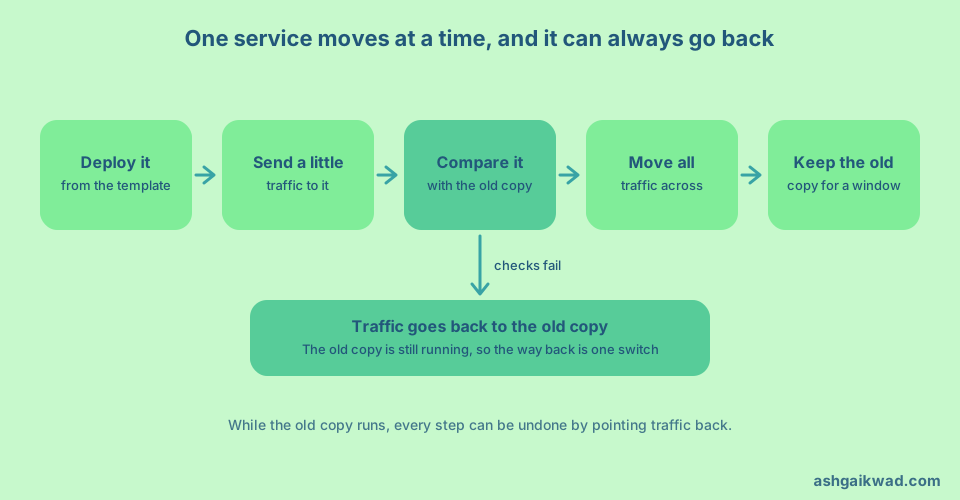
Move one service at a time, with old and new side by side
I moved traffic one service at a time, and each move had a tested way back. I also load tested services with k6 before each cutover.
The pattern has a name. Martin Fowler calls it the strangler fig, “a gradual approach to legacy modernization”. Of the plan to build a new system that does the same as the old one, he writes “we’ve seen this simple-sounding plan go down in flames most of the time”. The gradual way finds seams and replaces the pieces behind them. With small components, “there isn’t so much risk involved when we introduce the new software”.
For a platform migration the seam is the place where traffic reaches a service. It can be a load balancer, a gateway, an ingress or a DNS record. What matters is that you can send a share of requests to the new copy, and send them back. Fowler admits that people balk at building “transitional architecture” that goes away later, and argues that “the reduced risk and earlier value from the gradual approach outweigh its costs”. I agree.
Change where a service runs, and not what it does. If you upgrade the framework, fix a slow query and move the service together, a failure has three suspects.
Give every move a way back
Kubernetes has a rollback, but it does not cover a migration. The Deployment documentation says that when you roll back to an earlier revision, “only the Deployment’s Pod template part is rolled back”. That command fixes a bad release inside the cluster. If a migrated service is wrong, the way back is at the seam, and the old copy has to be still running so that traffic can return to it.
Data is where a way back usually breaks, because a new copy that changes shared data stops the old copy taking over again. Fowler’s parallel change pattern, also called expand and contract, breaks a backward-incompatible change “into three distinct phases: expand, migrate, and contract”. You remove the old shape only after the way back is no longer needed.
A way back counts only if you have used it. Before real traffic reaches the new copy, switch to it and back once, as you would in an incident, and time it. Decide who may flip the switch and which number triggers it, so nobody argues while users wait. Keep the old copy through the busiest and oddest day of that service, such as a month-end job, and delete it after that.
Which services go first, and which go last
This is the order I would use. Start with a service that you can afford to lose for an hour and that looks like many others, such as a stateless HTTP service with few callers. It should be real enough to exercise the template and forgiving enough that a mistake costs little.
Then move services in groups of the same shape. Stateless services come first. Workers and queue consumers come next, and for them check graceful shutdown and duplicate processing, because a message can be handled twice while two copies run.
Leave three kinds for last. The first is anything that holds data, because you cannot flip data back with a routing change. The second is the shared entry points such as authentication and the gateway, because every other service depends on them and the earlier moves have already proved the template. The third is the service everyone is afraid of. By the time you reach it, the template has been through many moves.
Keep an inventory of each service’s owner, dependencies, data and traffic, so that the order is a decision and not a habit.
Put the guardrails in the pipeline
With many services, a person cannot check each move by eye. I added CI/CD guardrails, which were required checks, staged rollouts and automatic rollback. I also added per-service dashboards and alerts, and mean time to recovery fell by 80%.
The method is canarying. The Google SRE Workbook defines it as “a partial and time-limited deployment of a change in a service and its evaluation”. The part that gets the change is the canary and the rest is the control. In a migration, the new copy is the canary and the old copy is the control. In the Workbook, if the canary’s error rate “is too far from the control error rate”, the deployment is bad, and “we should pause and roll back the deployment, or perhaps contact a human”.
Do not judge by one number. The same chapter says a single success ratio “is not sufficient for a meaningful canary process”, because a service that answers ten times slower has a problem too. Compare error rate, latency and one saturation measure such as memory between the two copies. A good canary detects bad releases “with high confidence” and good ones “without false positives”. A gate that raises false alarms gets overridden.
The same idea applies to code that AI agents write, which I covered in how to set up guardrails for an AI coding agent.
Get the sponsor and the people lined up
Fowler says a gradual modernization needs us to “establish alignment on the key outcomes early, and then revisit regularly”. A platform migration touches every team, so it needs someone with the authority to say that the template is the only road. In my opinion a sponsor earns their place in two ways. They make the template binding, so exceptions are rare and visible, and they protect the time each team needs for its own move.
What it costs, and what I would not do
The method has real costs. You run two environments while they overlap, so you pay for both. It is slower than a weekend cutover, and it needs routing and comparison tooling that you throw away afterwards. The template is a constraint, and each service that does not fit becomes an exception somebody has to maintain. Safety features cost too, and the EKS guide notes that “a side-effect of using Readiness Probes is that they can increase the time it takes to update Deployments”.
There are four things I would not do. I would not run a big-bang cutover, because one failure then has the whole system as its blast radius. I would not let each team write its own manifests, because you would end up with 120 ways to fail. I would not move data stores together with stateless services. I would not report progress as a count of services moved, because a count says how much changed and not whether things got better.
How to tell it worked
Pick three measures before the first move, so you have a baseline. Recovery time says whether failures are handled faster. Pages say what the move did to the people on call. The infrastructure bill says whether the platform pays for itself. Also define what “no downtime” means in numbers. The Google Workbook suggests using “SLOs and error budgets to measure the impact of releases on your reliability”.
My numbers were these. After the guardrails and dashboards, mean time to recovery fell by 80%. I reduced on-call load by 80% by removing noisy alerts, routing each alert to the team that owns the service, and writing runbooks. I also designed the incident process, with severity levels, roles and blameless post-mortems, and ran the post-mortems. Google’s SRE Workbook says that “a truly blameless postmortem culture results in more reliable systems”, which is how I ran them (see its chapter on postmortem culture).
The cost result came after the move. I halved the infrastructure bill by right-sizing workloads and autoscaling them after the move to EKS. The EKS cost guidance says “Requests should align with the actual utilization” and that requests set too high leave unused capacity, “a large factor in total cluster costs”. Do not expect savings while two environments overlap.
A plan for the first weeks
- Define “no downtime” in numbers, and take a baseline of recovery time, pages and cost.
- Get a sponsor, and tell every affected team what the template will require of them.
- Build the template with health checks, resource limits, rolling deploys and a PodDisruptionBudget.
- Make an inventory of services with owner, dependencies, data and traffic, then pick the order by shape and risk.
- Practise the way back on the first service before any real traffic, and put the compare-and-roll-back gate in the pipeline.
- Move one service at a time, and keep each old copy for a window that fits it.
- Leave data and shared entry points for last, and review your three numbers after each group.
The pipeline gate in step 5 is the same idea as the one gate for every change that I describe in how I run my products with AI agents. If the last cutover feels like any other day, the work was done in the earlier weeks.
Frequently asked questions
Does Kubernetes give me zero downtime by itself?
Not for a migration. Rolling updates and readiness probes cover deploys inside the cluster. Moving a service from somewhere else needs a seam where you can shift traffic and shift it back.
Should I migrate one service at a time or all at once?
One at a time. Fowler’s strangler fig approach exists because, in his words, “we’ve seen this simple-sounding plan go down in flames most of the time”.
How do I roll back a service that breaks after I move it?
Send traffic back to the old copy, which has to be still running. kubectl rollout undo only rolls back “the Deployment’s Pod template part”, so it will not reverse a data change or a routing change.
Which services should I migrate last?
Services that hold data, shared entry points such as authentication and the gateway, and the one service everybody fears. Data goes last because you cannot undo it with a routing change.
How do I know the migration worked?
Compare recovery time, pages and infrastructure cost with a baseline you took before the first move. A count of services moved only measures activity.